NDIS Plan Manager Turnaround Times: How Long Should You Wait to Be Paid After Submitting an Invoice?
Written by Cory Nathan, founder of NDIS Invoice · Last reviewed
For a plan-managed invoice, the realistic total time from sending your invoice to money in your bank account is usually 5-10 business days - but that
13 min read
NDIS Plan Manager Turnaround Times: How Long Should You Wait to Be Paid After Submitting an Invoice?
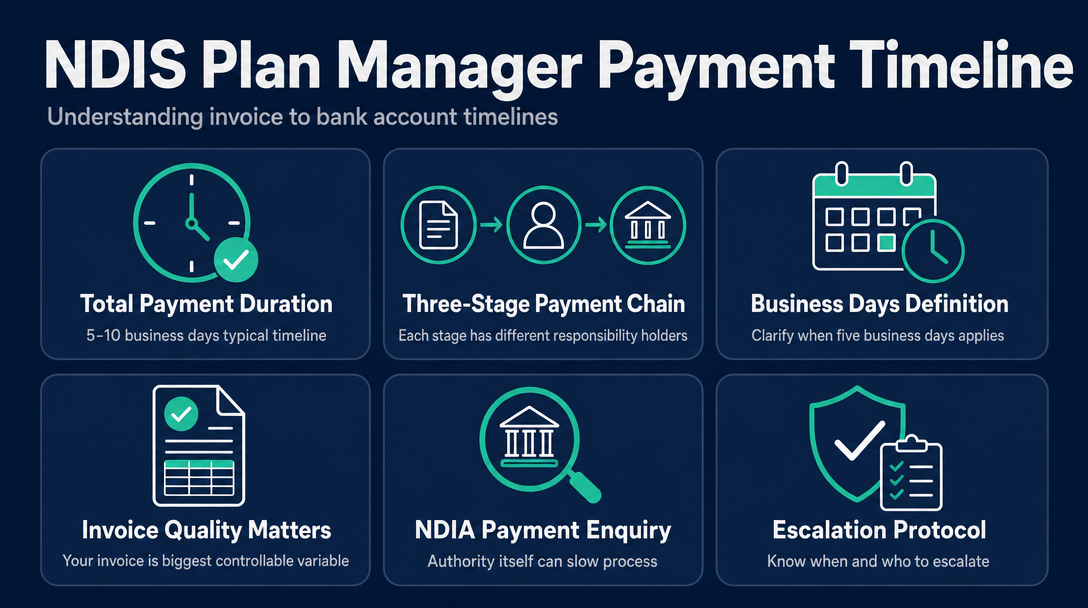
For a plan-managed invoice, the realistic total time from sending your invoice to money in your bank account is usually 5-10 business days - but that window is made up of three distinct stages, each controlled by a different party. Understanding which stage is stalling your payment is the fastest way to fix it.
The Three-Stage Payment Chain - and Who Owns Each Clock
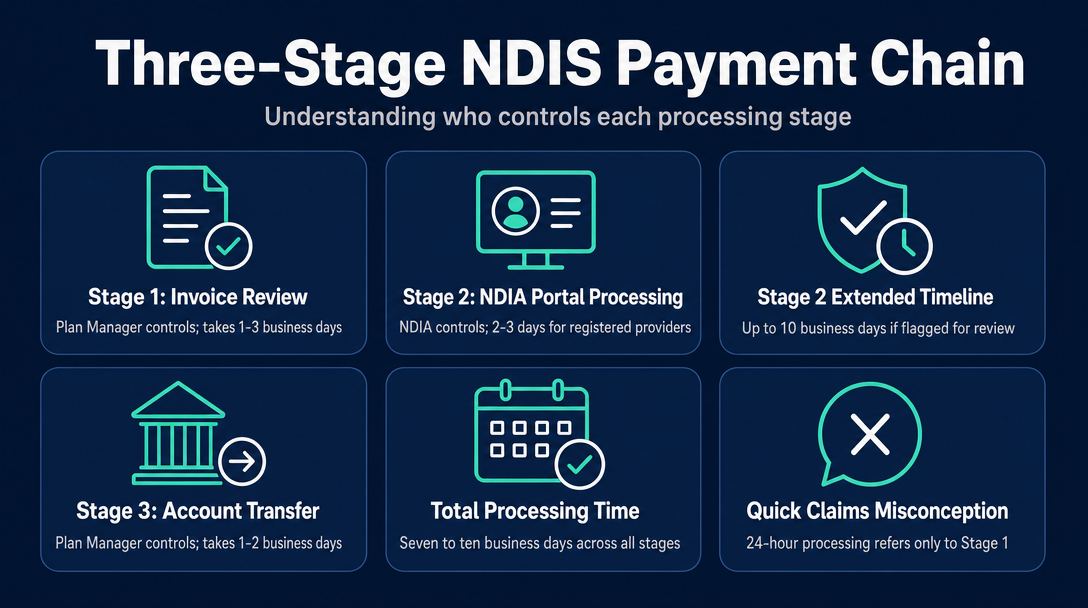
Most articles on NDIS invoice processing time quote a single number - "3 to 5 business days" - without explaining that this number is actually three separate clocks running in sequence. When payment is late, knowing which clock has stopped tells you who to call.
Here is how the Three-Stage Payment Chain works for plan-managed providers:
| Stage | Who Controls It | Typical Timeframe |
|---|---|---|
| Stage 1: Invoice review and approval | Plan Manager | 1-3 business days (varies by plan manager) |
| Stage 2: NDIA portal claim processing | NDIA | 2-3 business days for plan managers registered as "my providers"; up to 10 business days if not registered or if the claim is flagged for review |
| Stage 3: Final transfer to provider's account | Plan Manager | 1-2 business days after NDIA funds land |
The total of those three stages explains why a plan manager who advertises "24-hour processing" can still take 7-10 days to pay you. Their 24-hour claim refers only to Stage 1 - their internal review. Stages 2 and 3 still run on top of it.
Stage 1 - The Plan Manager's Review Window
When your invoice lands in a plan manager's inbox, their team checks that it is valid before submitting a claim to the NDIA. This means confirming the participant's details, the support item number, the price, and the service dates. A clean invoice moves quickly. An invoice with a query attached - wrong code, missing ABN, price above the cap - gets parked until you respond. Every back-and-forth adds at least 1-2 business days to your Stage 1 clock.
Stage 2 - The NDIA Portal Processing Window
Once the plan manager approves your invoice, they submit a payment claim through the myplace provider portal (or the newer my NDIS provider portal, which NDIA is progressively rolling out). The NDIA then processes that claim before releasing funds to the plan manager.
According to the NDIA's guide to getting paid, valid claims from plan managers registered as "my providers" are usually paid within 2 to 3 business days. If the plan manager is not recorded as a my provider, or if the NDIA needs to check the claim's accuracy, payment can take about 10 business days. This Stage 2 window is the single most important fact missing from most provider advice - and it is entirely outside your control once a clean invoice has been submitted.
Stage 3 - The Final Transfer to Your Account
After NDIA funds arrive in the plan manager's account, the plan manager transfers the payment to you. Most plan managers complete this within 1-2 business days. Some have a stated commitment in their service agreement; check yours for any specific timeframe.
What "5 Business Days" Actually Means - and When It Applies
The 5-business-day figure is the informal industry norm, not a legally mandated deadline. There is no single legislative provision that specifies a maximum payment period for plan managers paying providers. What does exist is regulatory obligation: plan managers are registered NDIS providers and must comply with the NDIS Practice Standards, which require them to manage funds with integrity and pay claims in a timely manner.
The NDIA's own published guidance confirms that plan managers listed as my providers will generally be paid within 2 to 3 business days by the NDIA once a claim is lodged. Stack the three stages together for a smooth transaction - 1 day (Stage 1) + 2-3 days (Stage 2) + 1 day (Stage 3) - and 5 business days is achievable. But that is the best-case scenario.
Real-world total times range from 5 business days for a clean invoice through a responsive plan manager, up to 20 or more business days when an invoice has errors, a Payment Enquiry is raised, or the plan manager's own processes are slow.
If you are comparing plan managers, ask whether they are registered as a my provider with the NDIA, and whether their service agreement states a specific payment commitment. These two factors significantly affect your Stage 2 and Stage 3 windows respectively.
This article is scoped to plan-managed arrangements. For a side-by-side comparison of how funding types shape the invoice format itself, see the earlier guide on NDIS funding types and invoice formats.
Why Your Invoice Is the Biggest Variable You Control
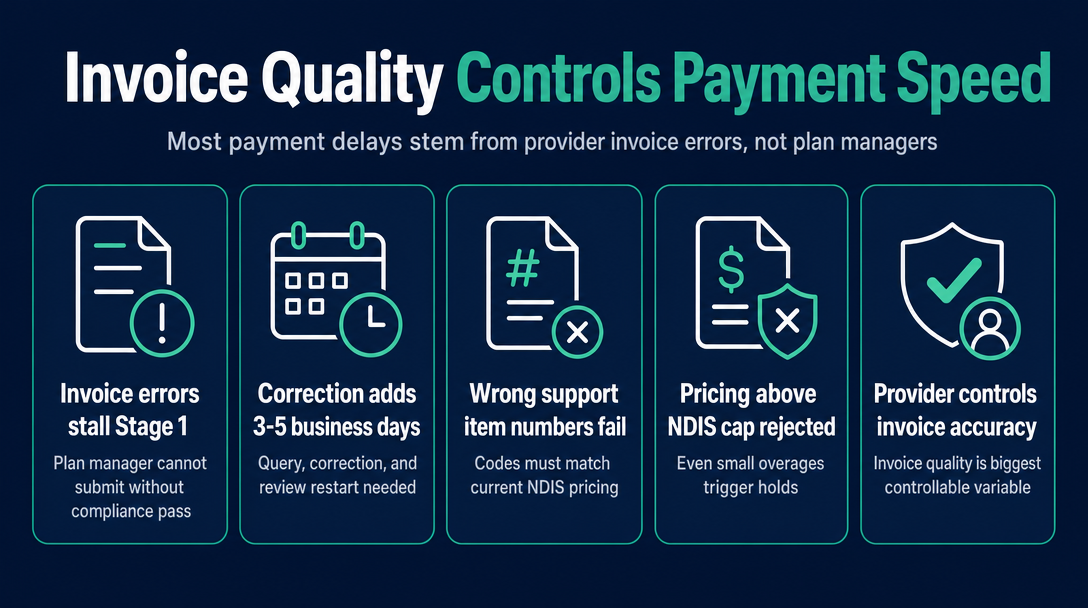
Competitors typically advise providers to "choose a better plan manager" when payment is slow. That advice ignores the most common single cause of delay: the plan manager's Stage 1 clock is stalled because of an error on the provider's invoice - not because the plan manager is slow.
A plan manager cannot submit a payment claim to the NDIA for an invoice that fails their compliance check. When they find a problem, they must query the provider, wait for a corrected invoice, and restart their review. That process alone can add 3-5 business days before Stage 2 even begins.
The Errors That Pause the Plan Manager's Clock
These are the most common provider-side errors that trigger a Stage 1 hold:
- Wrong or outdated support item number - plan managers cannot claim a code that does not exist in the current NDIS Pricing Arrangements. Codes change with each pricing update; an old code from a previous financial year will fail.
- Price above the current NDIS price cap - even a few cents over the cap for a support item makes the line item invalid. The cap is not a suggestion; it is the ceiling the NDIA will fund.
- Wrong day or time classification - invoicing a standard weekday rate for a Saturday shift (or vice versa) is one of the most frequent errors. The rate billed must match the actual day and time the support was delivered.
- Missing or invalid ABN - the NDIA's guide to getting paid confirms that invoices must include a valid ABN (unless you are ABN-exempt). A missing ABN will stop the invoice at Stage 1.
- Missing or incorrect participant NDIS number - the plan manager uses this to match your invoice to the participant's plan. Without it, the claim cannot be lodged.
- Service date outside the participant's active plan period - if the date of support falls outside the participant's current plan, the claim cannot be processed against that plan's budget.
- Duplicate invoice number - plan managers' accounting systems flag duplicates as potential double-billing. This halts the invoice until clarified.
- Vague or absent service description - plan managers must satisfy themselves that the claimed support is funded under the participant's plan. "Support worker services" with no further detail invites a query.
One Pass Before You Send: What to Check
Before your invoice leaves your hands, confirm the support item number matches the current Pricing Arrangements, the price sits at or below the current cap, and the day/time classification reflects when the support was actually delivered.
A free, browser-based tool like NDIS Invoice runs exactly these checks against the current NDIS Pricing Arrangements before your invoice is sent - catching code, price cap, and day/time errors on the spot, without uploading any data to a server. Catching an error yourself takes seconds. Waiting for a plan manager query and restarting Stage 1 of the Three-Stage Payment Chain costs you days.
The Payment Enquiry - When the NDIA Itself Slows Things Down
None of the commonly referenced articles on NDIS invoice processing time mention this mechanism - but providers who have experienced it know how disorienting it is to be told your invoice has been "submitted" and still not be paid weeks later.
A Payment Enquiry (PE) occurs when a plan manager cannot process your invoice directly through the myplace provider portal. This can happen because the participant's plan has recently been updated, because a specific support category requires NDIA manual review, or because there is a data mismatch between the invoice and the participant's plan record. In those cases, the plan manager submits a PE on your behalf, asking the NDIA to process the payment manually rather than through the standard automated portal path.
For guidance on what can trigger a PE and how to troubleshoot payment claims, the NDIA publishes a claims troubleshooting guide.
What a PE means for your timeline: the standard Stage 2 window no longer applies. The NDIA's manual review takes longer than the automated portal path, and once the NDIA resolves the PE and notifies the plan manager, Stage 3 still needs to run. The total additional time a PE adds to your payment can be significant.
What you should do when your plan manager raises a PE: ask them specifically what triggered it. There are two categories:
- Provider-side cause - wrong support item, plan period mismatch, or a data error on your invoice. In these cases, issuing a corrected invoice can resolve the underlying issue and allow the plan manager to resubmit through the standard path.
- NDIA or plan administration cause - a plan transition, budget query, or system issue on the NDIA's side. In these cases, the resolution is out of your hands, and the plan manager must manage the PE process with the NDIA directly.
A well-formed, correctly coded invoice rarely triggers a PE. The most reliable way to avoid one is to ensure your invoice is error-free before it reaches the plan manager.
When to Escalate - and to Whom
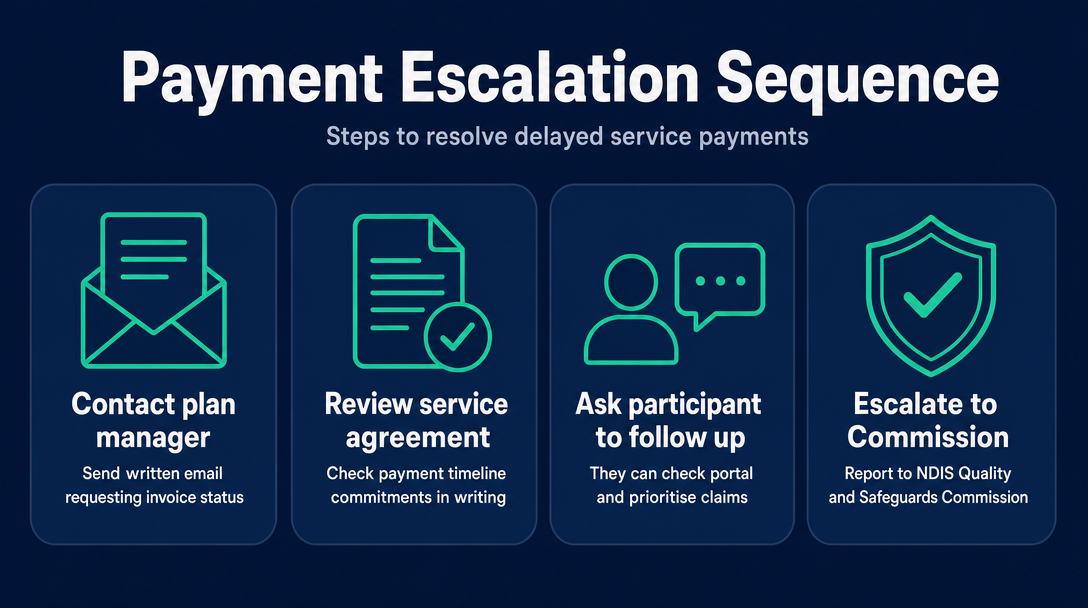
If you have not received payment and have not received a satisfactory explanation, follow this escalation sequence:
- Contact your plan manager in writing - email (not just a phone call) asking for the invoice status and the reason for any delay. A written request creates a record and makes a response harder to ignore.
- Check your service agreement - some plan managers commit in writing to paying within a specific number of business days after receiving NDIA funds. If yours does and the commitment has been missed, cite it in your follow-up.
- Ask the participant to follow up - in a plan-managed arrangement, the participant has visibility of their plan budget and can contact their plan manager or check their NDIS portal for claim status. Participants can also authorise payments and ask their plan manager to prioritise outstanding claims.
- Escalate to the NDIS Quality and Safeguards Commission - plan managers are registered NDIS providers and are bound by the NDIS Code of Conduct and Practice Standards. Persistent, unexplained non-payment can constitute a quality and safeguarding matter reportable to the Commission.
The NDIS Commission's remit is quality and safeguarding compliance, not debt recovery. If a payment dispute involves a significant amount and all other avenues have been exhausted, you may also have recourse through your state's Fair Trading or consumer protection body.
If your plan manager has formally rejected your invoice - as opposed to delayed it - the steps above do not apply. See the guide to fixing and resubmitting a rejected NDIS invoice for the correction and resubmission workflow.
Red flags that suggest a systemic problem rather than a one-off delay:
- No written acknowledgement of your invoice within 3 business days of submission
- No explanation provided when you ask for one
- The same pattern repeating across multiple invoices over multiple months
- Difficulty reaching the plan manager by any contact method
Frequently Asked Questions
Is there a law that says how fast a plan manager must pay invoices?
There is no single legislative provision that sets a specific maximum payment period for plan managers paying providers. Plan managers are bound by the NDIS Practice Standards and Code of Conduct, which require them to manage funds with integrity and pay claims promptly - but "promptly" is not defined as a fixed number of days. Some plan managers set their own commitment in the service agreement they sign with participants and providers; check yours for any stated timeframe.
What is the difference between a plan manager "processing" an invoice and the NDIA "paying" the claim?
Processing and paying are two separate steps. When a plan manager processes your invoice, they complete their Stage 1 review and submit a payment claim to the NDIA. The NDIA then processes that claim in Stage 2, which typically takes 2-3 business days for plan managers registered as my providers, or up to 10 business days otherwise. Only after the NDIA releases funds to the plan manager can the plan manager pay you in Stage 3. "We've processed your invoice" does not mean payment has been initiated to your account.
Why does my plan manager say they have processed the invoice but I still have not been paid?
This is the most common source of confusion in the Three-Stage Payment Chain. "Processed" typically means the plan manager has completed Stage 1 and submitted the claim to the NDIA. Stage 2 - the NDIA's own processing window of 2-3 business days (or up to 10 if flagged) - still needs to complete before funds reach the plan manager. Until that happens, the plan manager has nothing to transfer to you.
What is a Payment Enquiry (PE)?
A Payment Enquiry is a manual request a plan manager submits to the NDIA when they cannot process your payment claim directly through the provider portal. It occurs when there is a data mismatch, a plan administration issue, or a support category that requires NDIA manual review. A PE replaces the standard automated Stage 2 process and takes longer to resolve. Clean, correctly coded invoices rarely trigger one.
Does the end of a participant's plan period affect whether my invoice can be paid?
Yes. A service date that falls outside the participant's current plan period cannot be claimed against that plan's budget. If a participant's plan has expired or transitioned and you are invoicing for support delivered in the previous plan period, the plan manager may be unable to process the claim without NDIA involvement. Invoice as promptly as possible after delivering support, and always ensure the service date on your invoice matches the period when support was actually provided.
Can a plan manager refuse to pay an invoice?
A plan manager can decline to process an invoice that is non-compliant - for example, if the support item is not funded under the participant's plan, the price exceeds the NDIS price cap, or the invoice contains errors they cannot resolve. This is different from a delayed payment. If your invoice has been formally declined rather than held pending a query, the correction and resubmission process applies.
Before you send your next invoice to a plan manager, run it through NDIS Invoice - a free, browser-based tool that checks your support item code against the current NDIS Pricing Arrangements, flags any price above the current cap, and catches wrong day/time classifications before they reach the plan manager's inbox. Nothing is stored or sent to a server. Catching a code error yourself takes seconds; waiting for a plan manager query and restarting Stage 1 of the Three-Stage Payment Chain can cost you 3-5 business days.
More articles
- How to Create Your First NDIS Invoice in Under 5 Minutes (Step-by-Step Video Companion)
- NDIS Invoice Numbering: Do You Need a Sequential System? (And What Happens If You Don't Have One)
- How to Handle a Rejected NDIS Invoice: Diagnosis, Correction, and Resubmission Step by Step
- NDIS Allied Health Invoicing: How Physiotherapy, Speech Therapy, and OT Codes Work in the Price Guide
- NDIS Respite (Short-Term Accommodation) Invoicing: Codes, Rates, and Common Errors